Live, shared, and yours

Gather everyone around one table.

TakJa is the shared space where your group plans, plays and decides together. Trips, shops, watch parties, trivia nights, classrooms: everyone at the same table, in real time, on any device.

Nothing to install · Phone, tablet and desktop

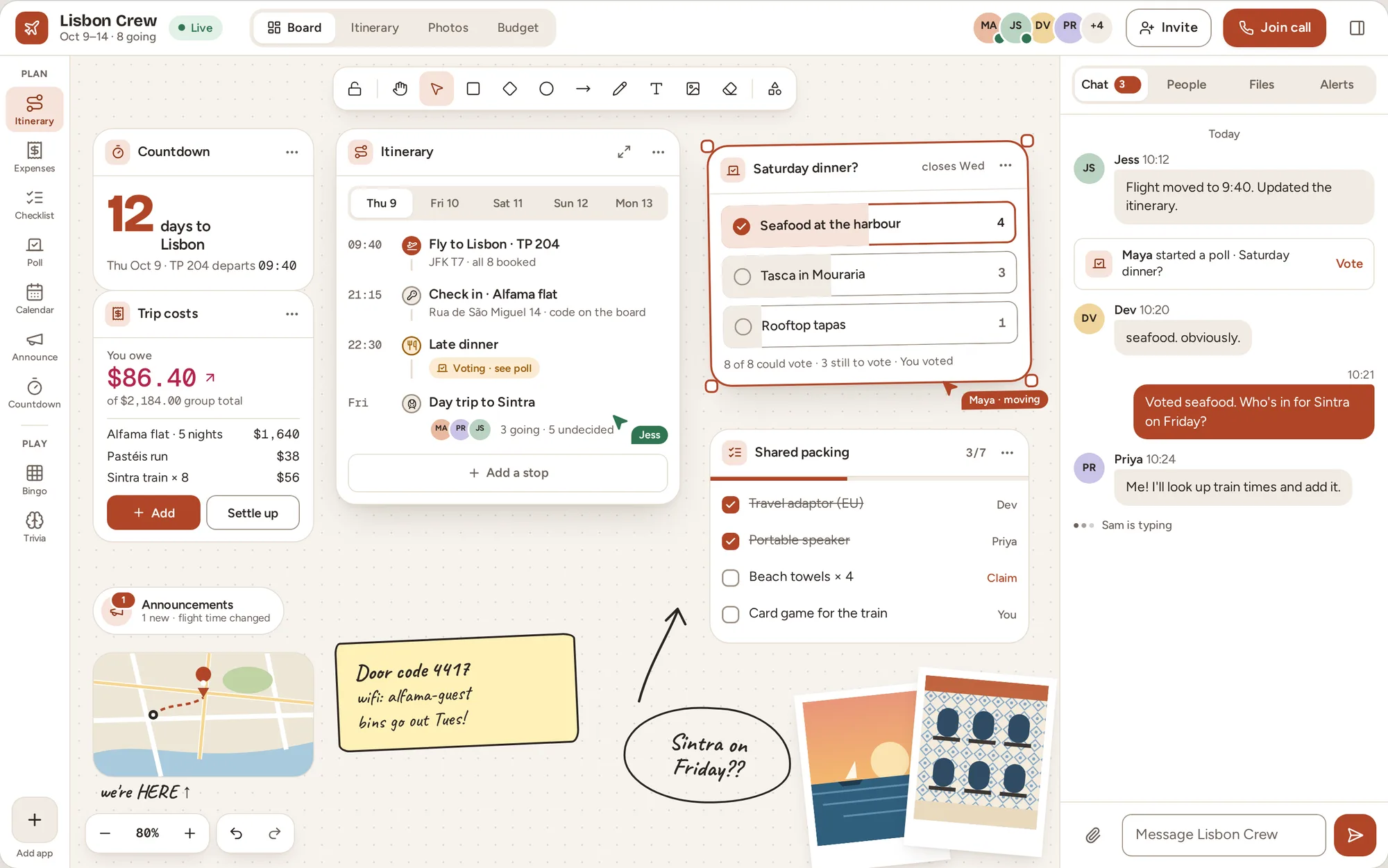
The Lisbon Crew table: a countdown, trip costs, an itinerary, a dinner vote, a shared packing list, sticky notes and a group chat
  • Group trips
  • Small shops
  • Watch parties
  • Trivia nights
  • Classrooms
  • Book clubs
  • Family plans
  • Weddings
  • Game nights
  • Team offsites

Made with TakJa

One table. Endless ways to gather.

Every table starts as a blank board. Pull up the tools you need, give it your colours and fonts, and invite your people. Here are five tables people could make this week.

Group trip

Eight friends. Five days. One trip HQ.

The Lisbon Crew plan everything on one board: a countdown to take-off, the day-by-day itinerary, who owes what, a vote on Saturday's dinner and a packing list people claim items from. No more digging through the group chat for the door code.

  • Itinerary with places and times
  • Split the costs, settle up once
  • Polls that close themselves
Group trip table with a countdown, trip costs, an itinerary, a dinner poll and a packing checklist
Apparel shop

A lookbook your customers can walk around in.

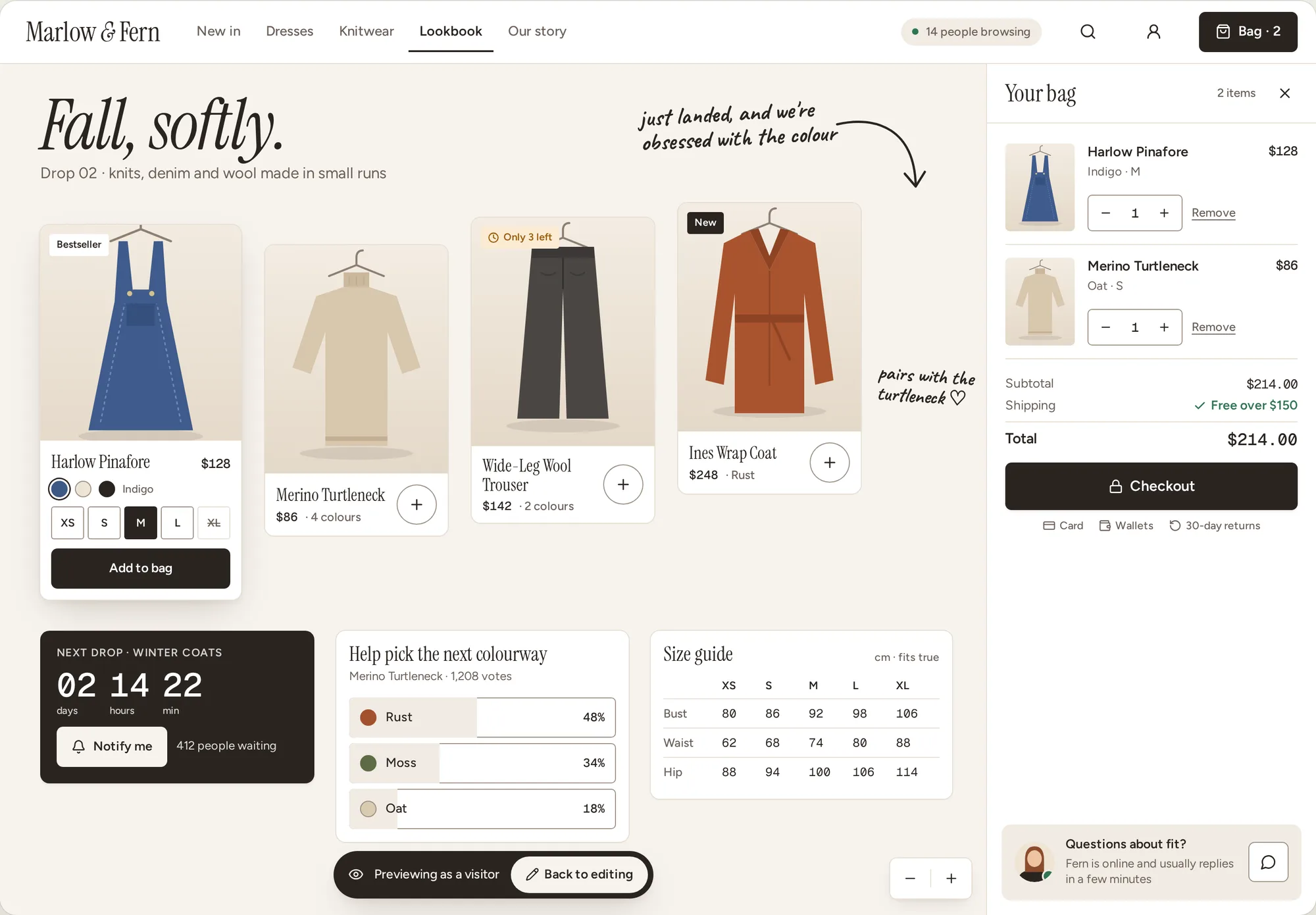
Marlow & Fern turn their table into a storefront. Shoppers browse the drop, vote on the next colourway and chat with the owner, while the owner's sketched notes stay right on the board. Same table, visitor view.

  • Your fonts, your colours
  • Countdowns and live polls
  • Store and checkout tools Coming soon
Apparel shop table showing product cards, a shopping bag, a drop countdown, a colourway vote and a size guide
Movie night

Watch together, from anywhere.

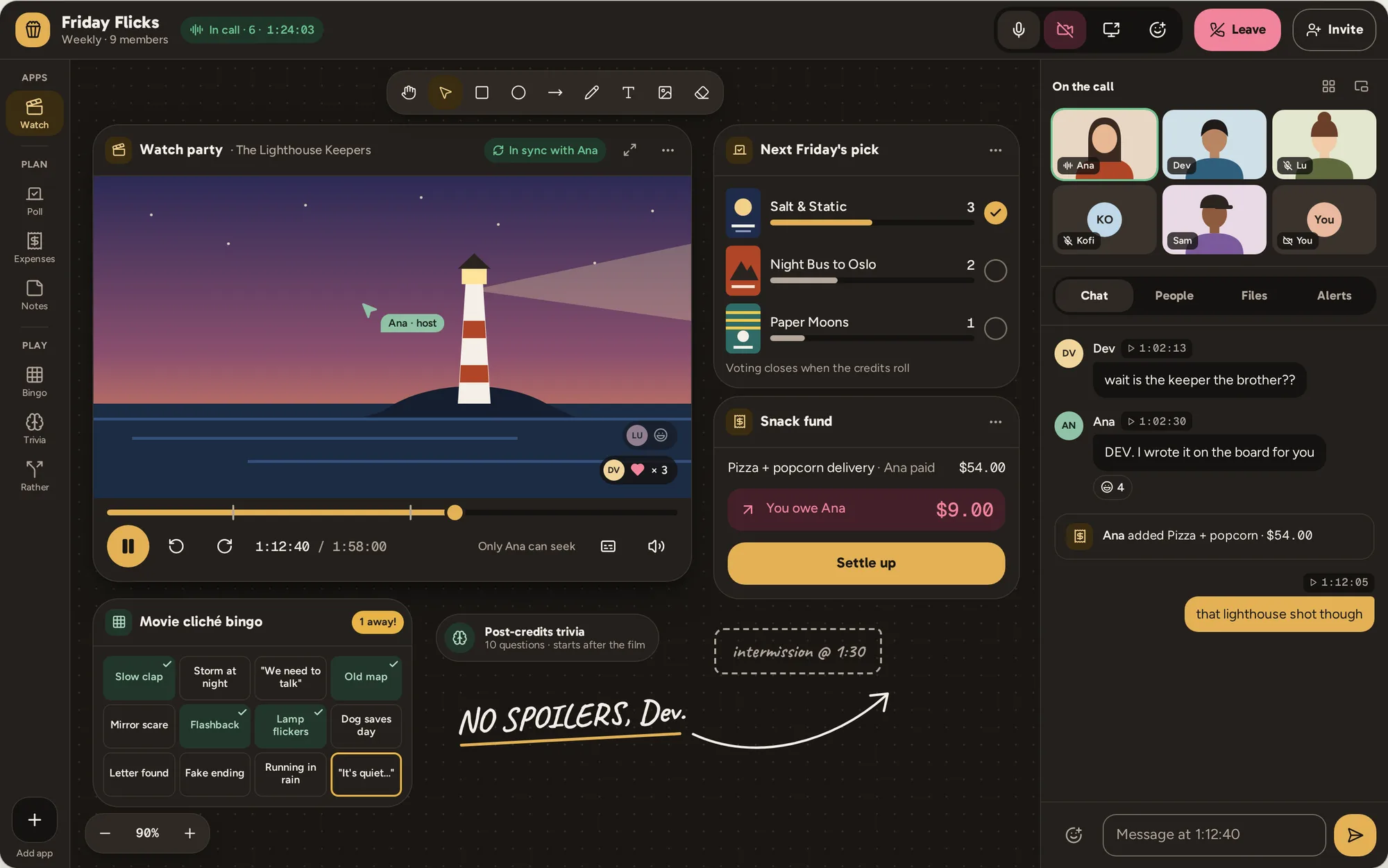
Friday Flicks press play at the same moment. Everyone's camera sits right on the board, the video stays in sync for all six, and the snack fund, the cliché bingo and next week's vote are one glance away. Chat is stamped with the film's timecode.

  • Watch parties that stay in sync
  • Voice, video and screen share on the board
  • Bingo, trivia and more between reels
Movie night table in dark mode with a synced watch party, video call tiles, a poll, a snack fund and movie bingo
Trivia club

Game night, with the whole pub playing.

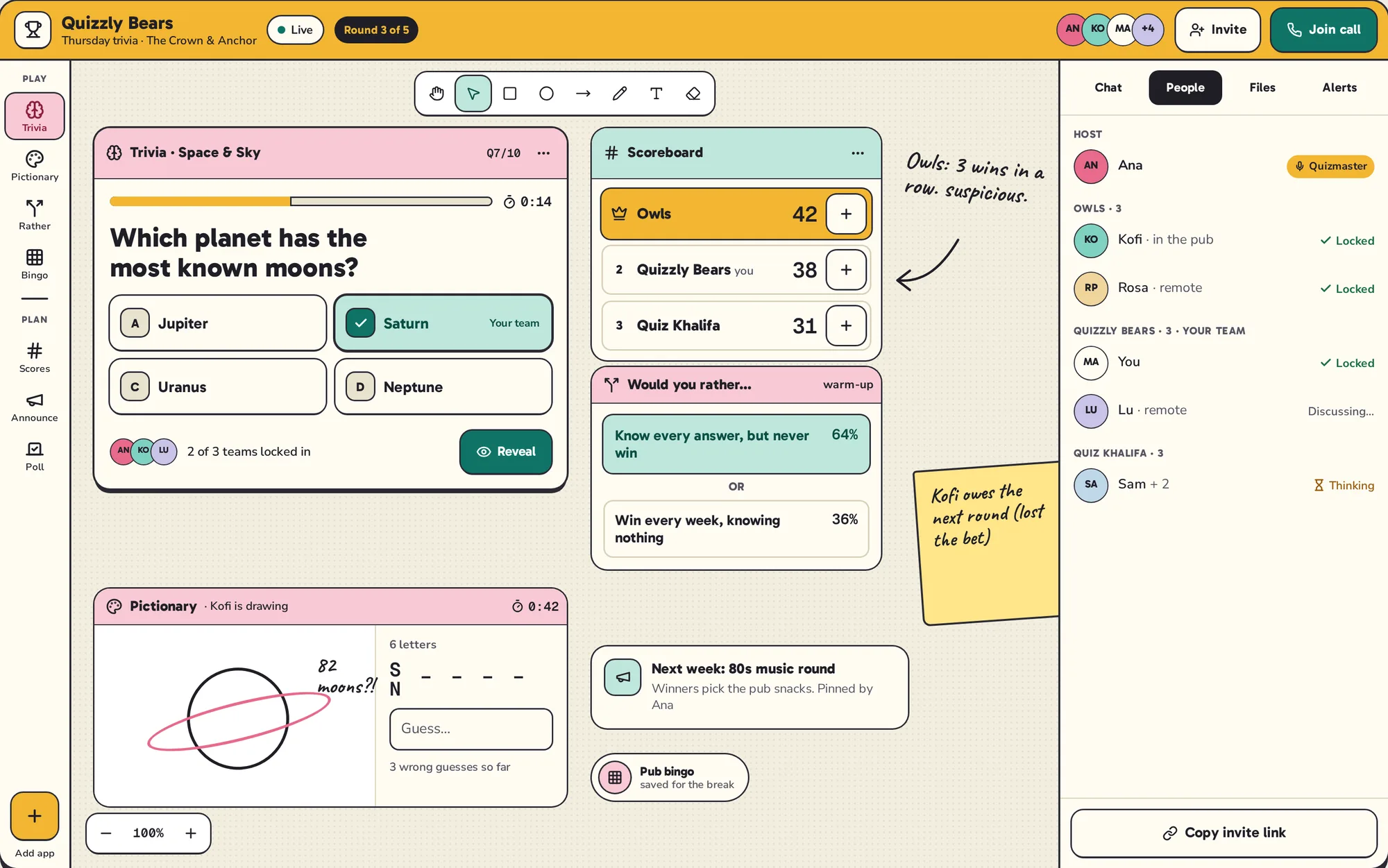
Quizzly Bears run their weekly quiz on a TakJa table. Teams lock in answers, the scoreboard updates for everyone, and there's always a round of Pictionary or Would You Rather to settle a tie.

  • Trivia, bingo, Pictionary, Would You Rather
  • Teams, scores and live reveals
  • Invite a whole room with one link
Trivia club table with a question card, a live scoreboard, Would You Rather and Pictionary
Classroom

A lesson the whole class is inside.

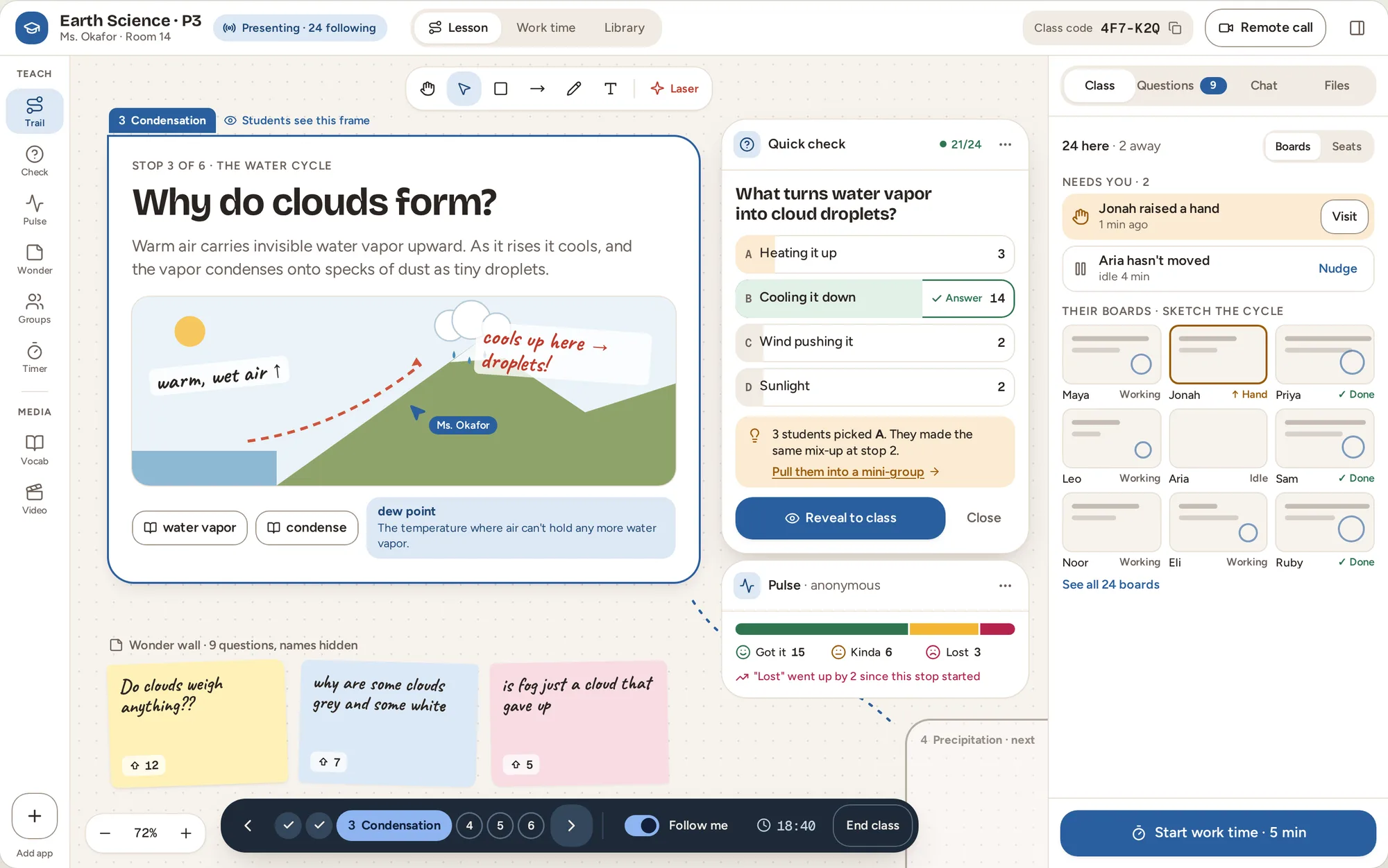
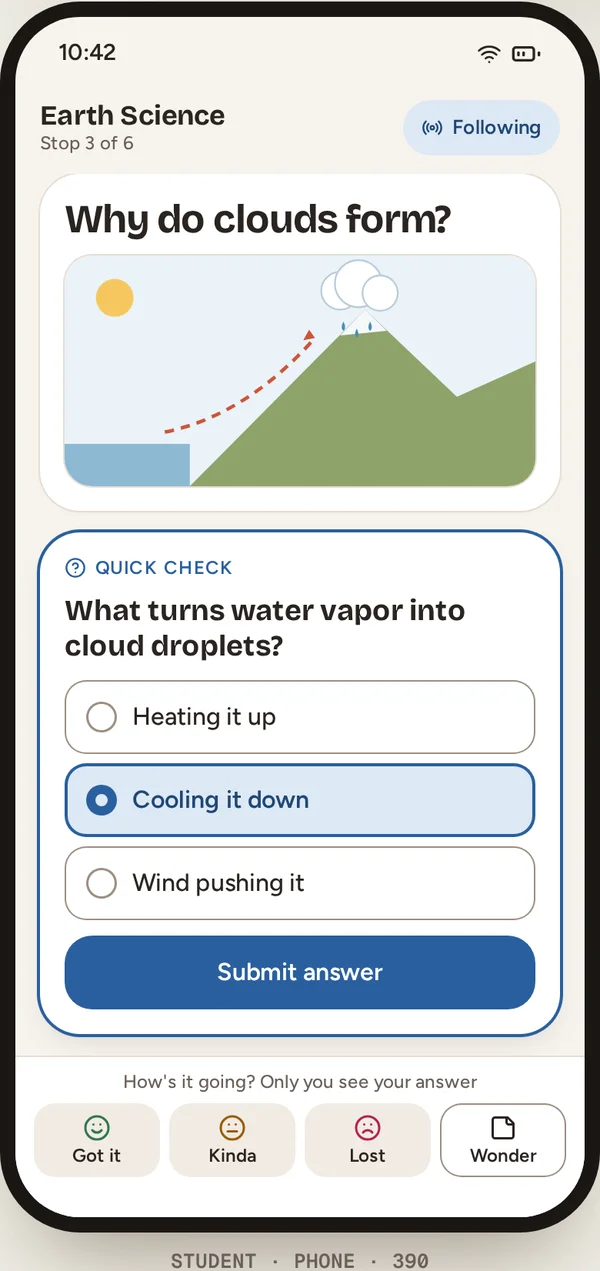
Ms. Okafor teaches the water cycle on one board. Students follow along on their own screens, answer quick checks, and drop questions on the wonder wall, even the ones they would never ask out loud.

  • Follow the teacher's view
  • Quick checks and live results
  • Works on every student's phone
Classroom table with a lesson frame, a quick check, student responses and a wonder wall of sticky notes The same lesson on a student's phone, answering a quick check

Better together

Everyone's here. Right now.

A TakJa table isn't a document you take turns on. It's a room. See who's around, watch ideas land as they're made, and decide things in minutes instead of days.

  • Live cursors and presence

    See who's at the table and what they're pointing at. Follow someone's view with one tap.

  • Chat beside the board

    Talk it through without leaving the table. Messages link back to the thing you're talking about.

  • Calls on the board

    Faces and shared screens sit right on the canvas, next to the plan, not in a separate window.

  • Decide together

    Polls, votes and claims settle it fast. Everyone sees the result the moment it changes.

  • Watch in sync

    Play, pause and seek once, and it happens for everyone. YouTube, Vimeo or your own uploads.

  • Room for everyone

    Owners, admins, members and viewers. Invite with a link, and choose who can change what.

The toolbox

Pull up the tools your group needs.

Drop any of them onto the board, resize them, arrange them. Everything stays in sync for everyone.

  • 💸Split BillsWho paid, who owes, one tap to settle
  • 🗺️ItineraryDays, stops and real places with maps
  • 📅CalendarEvents, RSVPs and reminders
  • ✅Checklist & TasksClaim it, check it, done
  • 📊PollsSettle it with a vote
  • 🎬VideoWatch together, perfectly in sync
  • 📣AnnouncementsThe things nobody should miss
  • 📝NotesShared notes for the whole table
  • 🧠TriviaHost a quiz night
  • 🎲BingoRoad-trip or movie-cliché bingo
  • ✏️PictionaryDraw it, guess it
  • 🤔Would You RatherThe great debate

Plus a full whiteboard for drawing and sticky notes, photo and file sharing, and voice, video and screen share for the whole table.

Make it yours

Your table should look like your people.

Pick an accent colour, a font personality and corner style, light or dark. A book club, a trivia league and a clothing label can all feel completely different, and they all work the same way.

Hearth Editorial Game night Playful Classroom

In every pocket

TakJa works in the browser on phones, tablets and computers. Nothing to download. Tap an invite and you're at the table.

Start a table

Questions

Good to know

What is TakJa?

TakJa is a live, shared space for groups. Each table is a board that everyone edits at the same time, with tools for plans, money, votes, games and video, plus chat and calls built in.

What does “TakJa” mean?

Takja (탁자) is Korean for “table”: the place people gather to plan, eat, play and talk.

Can everyone use it at the same time?

Yes. That's the point. Everyone sees the same board live: cursors, edits, votes, chat and video all update for the whole table as they happen.

Does TakJa work on phones?

Yes. It runs in the browser on phones, tablets and computers, with nothing to install.

Who decides what goes on the table?

The person who starts a table can make others admins, members or viewers. Members join in; viewers watch along. Some tools, like a watch party's video, are chosen by the owner or an admin.

Pull up a chair.

Start a table in seconds and invite your people with a link.

Start a table